Why Framer is the Ideal Platform for SaaS and AI Startups
Why Framer is the Ideal Platform for SaaS and AI Startups
In this blog, you will learn why Framer is ideal for SaaS and AI startups, and how to quickly build a landing page for your MVP.

Niklas Hass
Framer Expert & Founder Webnity X | June 2026
Framer Expert & Founder of Webnity X
June 2026
Insights
3 Minuten
Insights
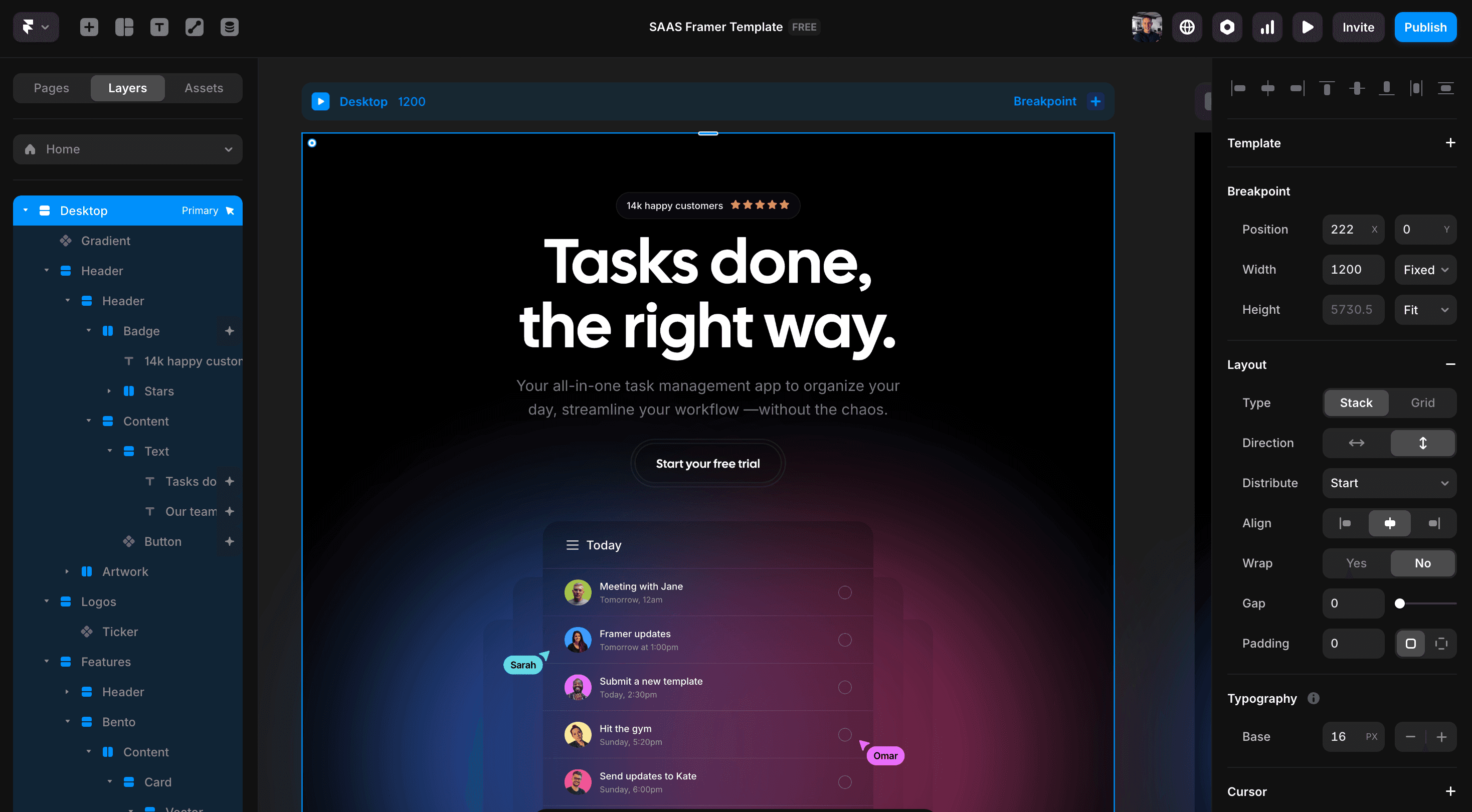
Table of Contents
What is Framer and Why is it Ideal for Startups?
Framer is a modern no-code platform for creating high-performance websites – visually, swiftly, and entirely without developers. It is particularly ideal for startups in the SaaS and AI sectors. Here, speed, flexibility, and a compelling digital presence are crucial from the outset.
With Framer, you can create professional landing pages, MVPs, or product pages in no time – perfect for teams aiming to achieve great results with limited resources.
Key Advantages of Framer for SaaS and AI Startups
Swift MVP Launch
With Framer, you can build a functional landing page in just a few hours – perfect for product ideas, pre-launches, or initial market tests. Visual development without code: everything is designed directly in the browser – no developers, no complicated setups required, saving time and resources.
Pre-Built Startup Templates
Framer offers a wide range of templates, specifically for SaaS, AI, and tech products. There's no need to design from scratch – simply adapt what's already effective.
Integrated CMS & SEO
Manage content flexibly while improving Google rankings – thanks to clean code, fast loading times, and built-in SEO tools in Framer.
Instant Publishing with Hosting Included
With a single click, your site is live – hosting, versioning, and domain management are seamlessly integrated.
Modern Design & Animations
Framer represents high-quality visual language – encompassing interactive effects, micro-animations, and smooth transitions.
How to Build a Landing Page for Your MVP with Framer
In the early stages of a startup, every hour counts. A landing page for your MVP (Minimum Viable Product) should explain your product, build trust, and generate initial leads – without months of development. With Framer, this can be achieved in a few steps:
1. Start with a Suitable Template
Select one of the Framer startup templates that matches your product and style. You can easily customize it, saving you the effort of designing from scratch.
2. Focus Your Message
The hero section should instantly clarify what your product is about. Use a clear heading, a subtitle, and a concise call-to-action (e.g., “Try Now” or “Book Demo”).
3. Showcase Your Product in Action
Utilize screenshots, brief descriptions, or animated demos to make your product tangible. In Framer, animations and scroll effects can be incorporated without coding.
4. Prove Your Value
Incorporate sections for features, testimonials, logos from partners or clients, and concrete benefits. These areas boost trust and enhance conversion rates.
5. Integrate Forms or Call-to-Actions
Include a simple form (e.g., using Framer Forms or external tools like Tally) to collect emails or trigger user actions.
6. Optimize for Mobile and SEO
Framer automatically creates responsive pages. However, make sure to check the mobile view, set relevant meta tags, ALT texts, and descriptive URLs for better Google rankings.
7. Publish Directly with Framer Hosting
After a final check, simply click “Publish” – your site goes live, securely hosted, and ready to launch immediately.
Need Assistance with Your Landing Page?
Want to bring your MVP online quickly but need help with construction or design? No problem – we are here to assist you.
Simply fill out our contact form or send us a brief email at info@webnity-x.com.
What is Framer and Why is it Ideal for Startups?
Framer is a modern no-code platform for creating high-performance websites – visually, swiftly, and entirely without developers. It is particularly ideal for startups in the SaaS and AI sectors. Here, speed, flexibility, and a compelling digital presence are crucial from the outset.
With Framer, you can create professional landing pages, MVPs, or product pages in no time – perfect for teams aiming to achieve great results with limited resources.
Key Advantages of Framer for SaaS and AI Startups
Swift MVP Launch
With Framer, you can build a functional landing page in just a few hours – perfect for product ideas, pre-launches, or initial market tests. Visual development without code: everything is designed directly in the browser – no developers, no complicated setups required, saving time and resources.
Pre-Built Startup Templates
Framer offers a wide range of templates, specifically for SaaS, AI, and tech products. There's no need to design from scratch – simply adapt what's already effective.
Integrated CMS & SEO
Manage content flexibly while improving Google rankings – thanks to clean code, fast loading times, and built-in SEO tools in Framer.
Instant Publishing with Hosting Included
With a single click, your site is live – hosting, versioning, and domain management are seamlessly integrated.
Modern Design & Animations
Framer represents high-quality visual language – encompassing interactive effects, micro-animations, and smooth transitions.
How to Build a Landing Page for Your MVP with Framer
In the early stages of a startup, every hour counts. A landing page for your MVP (Minimum Viable Product) should explain your product, build trust, and generate initial leads – without months of development. With Framer, this can be achieved in a few steps:
1. Start with a Suitable Template
Select one of the Framer startup templates that matches your product and style. You can easily customize it, saving you the effort of designing from scratch.
2. Focus Your Message
The hero section should instantly clarify what your product is about. Use a clear heading, a subtitle, and a concise call-to-action (e.g., “Try Now” or “Book Demo”).
3. Showcase Your Product in Action
Utilize screenshots, brief descriptions, or animated demos to make your product tangible. In Framer, animations and scroll effects can be incorporated without coding.
4. Prove Your Value
Incorporate sections for features, testimonials, logos from partners or clients, and concrete benefits. These areas boost trust and enhance conversion rates.
5. Integrate Forms or Call-to-Actions
Include a simple form (e.g., using Framer Forms or external tools like Tally) to collect emails or trigger user actions.
6. Optimize for Mobile and SEO
Framer automatically creates responsive pages. However, make sure to check the mobile view, set relevant meta tags, ALT texts, and descriptive URLs for better Google rankings.
7. Publish Directly with Framer Hosting
After a final check, simply click “Publish” – your site goes live, securely hosted, and ready to launch immediately.
Need Assistance with Your Landing Page?
Want to bring your MVP online quickly but need help with construction or design? No problem – we are here to assist you.
Simply fill out our contact form or send us a brief email at info@webnity-x.com.
Ready to start your premium Framer project with Webnity-X?
Our Framer experts will provide you with comprehensive consulting for your project, transforming your website into a genuine lead-generation powerhouse.





Rated 5.0 from over 25 reviews
Ready to start your premium Framer project with Webnity-X?
Our Framer experts will provide you with comprehensive consulting for your project, transforming your website into a genuine lead-generation powerhouse.
Rated 5.0 from over 25 reviews
Ready to start your premium Framer project with Webnity-X?
Our Framer experts will provide you with comprehensive consulting for your project, transforming your website into a genuine lead-generation powerhouse.
Rated 5.0 from over 25 reviews